You set up two syncs. A week later you notice a meeting showing up as “Busy” twice, at the same time, in two of your calendars. Nothing is broken. You have built a chain, and the switch Only events created in this calendar stops it.
What a chain is
A chain is two syncs that share a calendar in the middle. Calendar A syncs into B, and B syncs into C.
Hetk treats connected syncs as one setup. So A’s events reach C too, not only B’s own events. Here is a common version:
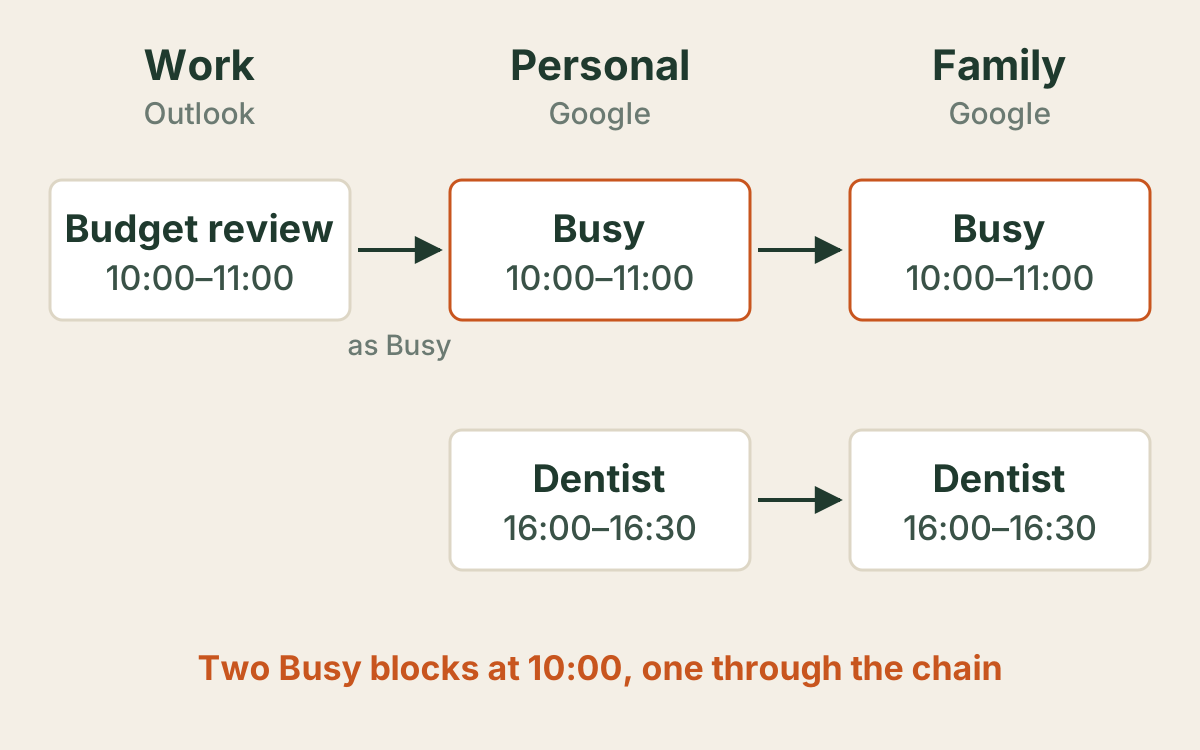
Your work calendar syncs into your personal one as Busy. Your personal calendar syncs with a family calendar you share with your partner. The dentist appointment was made in Personal, so it goes to Family, as you wanted. The budget review was made in Work, and it goes to Family as well, through Personal.
Why you see “Busy” twice
In Google Calendar you probably have Personal and Family both switched on. The budget review now sits in both, as two Busy blocks at 10:00. That is the doubled event.
Two things are worth knowing about the copy in Family:
- It is built from the original work meeting, not from the Busy copy in Personal. When the meeting moves or is cancelled, the copy in Family moves or goes too.
- It is never more open than the strictest sync on the way. The work sync shows Busy, so Family gets Busy, even though the family sync shows full details. Your work meeting titles do not leak into the family calendar through the chain.
Sometimes the chain is exactly what you want. Your partner sees when you are tied up at work, without seeing what the meeting is. If so, leave it and just hide one of the two calendars in your own view.
The switch that stops the chain
Each sync direction has a switch: Only events created in this calendar. Under it, Hetk explains: “Skips events that came in here from another sync, so they are not copied on again.”
Turn it on for the direction that leaves the middle calendar. In the example that is Personal → Family. Then Family gets only the events that were made in Personal, like the dentist. The budget review stays in Personal and goes no further.
  Work (Outlook)          Personal (Google)        Family (Google)
  ─────────────           ─────────────────        ───────────────
  Budget review   ──────▶  Busy          ──╳
  10:00–11:00     as Busy  10:00–11:00     Only events created
                                           in this calendar: on

                           Dentist       ──────▶   Dentist
                           16:00–16:30             16:00–16:30
The switch is per direction. If Personal and Family sync both ways, the Family → Personal direction has its own switch, and you can leave it off.
How to turn it on
- Open the sync between the middle calendar and the far one. In the example, that is Personal and Family.
- Go to step 3, Filters.
- Find the block for the direction that leaves the middle calendar, such as Personal → Family.
- Turn on Only events created in this calendar.
- Look at the week. Chained events stay on the grid, faded, marked “Skipped: only events created here”.
- Press Save. Hetk first tells you what the change does across the whole sync, such as how many copies it will remove. You can still cancel.
On the next sync, Hetk removes the chained copies from the far calendar. Your original events are never touched, and nor are the copies in the middle calendar.
You can set the same switch when you create a new sync. It is on the wizard’s Filters step. It is off by default, and it is part of every plan.
Frequently asked questions
Is this a bug?
No. Hetk treats syncs that share a calendar as one connected setup, so events travel along the whole chain. The switch is there for when you want each sync to copy only what was made in its own calendar.
Will turning the switch on delete my events?
No. Your own events are never touched. Hetk removes only the copies that reached the far calendar through the chain, and it shows you how many before you save.
Which direction do I put it on?
The direction that starts at the middle calendar, the one that both receives a sync and sends one. In the example, that is Personal → Family.
Does the switch also stop events I create in the middle calendar?
No. Events made in that calendar still sync as before. The switch only skips events that arrived there from another sync.
Can my work meeting titles leak into the family calendar through a chain?
No. A chained copy is never more open than the strictest sync along the way. If work syncs into Personal as Busy, the copy that reaches Family is Busy as well.
How do I check why an event was not copied?
Open the Calendar View for that sync and click the faded event. It names the setting that skipped it, for example: Your setting “Only events created in this calendar” on Personal → Family skipped this.